1What is DKIM?
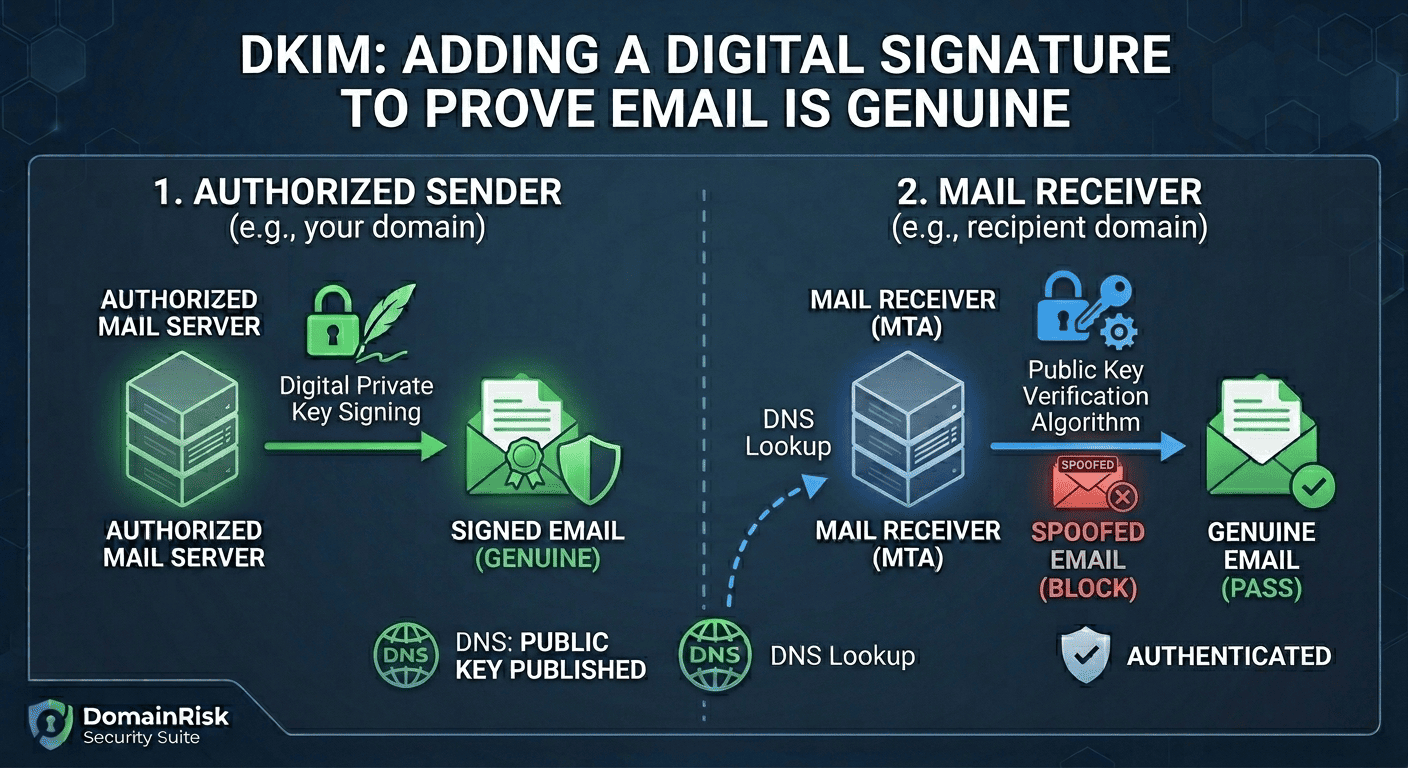
DKIM (DomainKeys Identified Mail) is an email authentication standard defined in RFC 6376 (September 2011). It allows the owner of a domain to attach a cryptographic digital signature to outgoing email messages. The receiving mail server verifies this signature using a public key published in DNS — proving that the message genuinely originated from the claimed domain and was not altered in transit.
Unlike SPF, which validates the envelope-level sender at the network layer, DKIM operates at the message layer. The signature travels with the email itself, inside a DKIM-Signature header. This means DKIM survives email forwarding — a critical advantage over SPF, which breaks the moment the Return-Path address changes.
- Origin authentication.DKIM proves that the sending domain authorised the message, using a private key held exclusively by the sender's mail infrastructure.
- Message integrity.The signature covers specified headers and the message body. Any modification to the signed fields after signing will cause the signature to fail verification — detecting tampering in transit.
- Forwarding resilience.Because DKIM is embedded in the message headers rather than tied to the network connection, it remains valid after forwarding — making it the more durable authentication mechanism compared to SPF.
- DMARC second pillar.DMARC requires at least one passing, aligned authentication mechanism. DKIM is the more reliable of the two because SPF alignment breaks under forwarding. Without DKIM, your DMARC protection depends entirely on SPF — a fragile single point of failure.
2Why "DKIM Missing" is a Critical Finding
Without DKIM, your DMARC policy rests on SPF alone — and SPF breaks under forwarding.
When a forwarded message arrives, the receiving server sees a new sending IP that is not in your SPF record. SPF fails. Without DKIM as a fallback, DMARC fails too. Legitimate email — newsletters, transactional messages, forwarded business email — gets blocked or rejected under your own DMARC policy.
DMARC enforcement is undermined
A DMARC policy at p=reject with no DKIM will fail on every forwarded message. Recipients using mail forwarding (university aliases, personal redirects, business email consolidation) will never receive your email — while spoofed messages that pass SPF alignment slip through undetected.
No proof of message integrity
Without DKIM, there is no cryptographic guarantee that a message was not modified between your mail server and the recipient's inbox. Man-in-the-middle modifications to headers or body content — including injected malicious links — cannot be detected by the receiving server.
Compliance and deliverability requirements
Google and Yahoo's February 2024 bulk sender requirements mandate DKIM signing for all senders above 5,000 messages per day. PCI-DSS 4.0 Requirement 5.4 and SOC 2 CC6.6 reference email authentication controls. A missing DKIM record is a traceable gap in security assessments and vendor questionnaires.
Deliverability and sender reputation damage
Gmail, Outlook and Yahoo assign sender reputation scores that incorporate DKIM pass rates. Domains that consistently fail DKIM — or carry no signature at all — receive lower deliverability scores. Transactional email, password resets and sales outreach are disproportionately affected.
3How DKIM Works — the Signing and Verification Chain
DKIM uses asymmetric cryptography. The sending domain holds a private key used to sign outgoing messages. The matching public key is published in DNS. Any receiving server in the world can use the public key to verify the signature — without needing direct access to the sender's infrastructure.
The sending MTA signs the outgoing message
As your mail server (or third-party sender) dispatches the message, it computes a hash of the specified headers and message body, then encrypts that hash with the private key. The result — the DKIM signature — is added as a DKIM-Signature header before the message leaves your infrastructure.
The signed message travels to the recipient
The message transits the internet with the DKIM-Signature header intact. Unlike SPF, which depends on the originating IP address, the DKIM signature is embedded in the message and survives any number of hops, relays or forwarding steps.
The receiving MTA extracts the selector and domain
On arrival, the recipient's mail server reads the d= (signing domain) and s= (selector) fields from the DKIM-Signature header. These two values together form the DNS query it will perform.
A DNS lookup retrieves the public key
The receiving server queries selector._domainkey.d= for a TXT record containing the public key. This is the only DNS query DKIM requires — and it costs no SPF lookup budget.
The signature is verified cryptographically
The receiving server decrypts the signature using the retrieved public key, recomputes the hash of the message headers and body, and compares the two values. If they match, DKIM passes. If any signed field was modified in transit, the hashes diverge and DKIM fails.
The result is passed to DMARC
DMARC receives the DKIM result alongside the SPF result. It additionally checks that the d= signing domain aligns with the visible From: domain. A DKIM pass with alignment satisfies DMARC even if SPF fails — which is why DKIM is essential for forwarding scenarios.
Why DKIM survives forwarding when SPF does not
When a message is forwarded, the forwarding server becomes the new sender. The envelope Return-Path changes, so SPF — which checks the sending IP against the Return-Path domain — fails. DKIM is unaffected because the signature lives in the message headers, not the network connection. The forwarding server passes the original signed headers unchanged, and the recipient's server verifies them directly against the original signer's DNS record.
4Anatomy of a DKIM Signature
The DKIM-Signature header is added to every outgoing message by your mail server. Here is a representative example with all common tags:
DKIM-Signature: v=1; a=rsa-sha256; c=relaxed/relaxed;
                d=yourdomain.com; s=google;
                h=from:to:subject:date:message-id;
                bh=47DEQpj8HBSa+/TImW+5JCeuQeRkm5NMpJWZG3hSuFU=;
                b=XjK9mN2...base64-encoded-signature...==;
t=1709500000; x=1712092000| Tag | Required | Description |
|---|---|---|
v= | Yes | Version — always 1. |
a= | Yes | Signing algorithm. Use rsa-sha256 (widely supported) or ed25519-sha256 (modern, smaller keys). Never use rsa-sha1 — it is deprecated and rejected by many providers. |
c= | Yes | Canonicalization algorithm for headers and body (header/body). relaxed/relaxed is standard — it tolerates minor whitespace changes introduced by mail relays. simple/simple is strict and fragile in practice. |
d= | Yes | The signing domain. For DMARC alignment, this must match or be a parent of the visible From: domain. |
s= | Yes | The selector — a short label that identifies which public key to use. Combined with d=, it forms the DNS query: selector._domainkey.d=. Multiple selectors can coexist on the same domain, one per sending service. |
h= | Yes | The list of headers included in the signature. Should always include from, to, subject, date and message-id at minimum. The From: header is the most security-critical signed field. |
bh= | Yes | Base64-encoded hash of the canonicalized message body. Acts as a tamper-evident seal on the email content. |
b= | Yes | The actual cryptographic signature — a base64-encoded RSA or Ed25519 signature of the hash of the canonicalized signed headers plus the body hash. |
t= | Recommended | Unix timestamp of when the message was signed. Allows receivers to detect replay attacks on very old signed messages. |
x= | Optional | Expiry timestamp. After this time, the signature is considered expired. Useful for time-sensitive messages but adds operational complexity. |
5The DNS Public Key Record
The public key is published as a DNS TXT record at selector._domainkey.yourdomain.com. Each sending service uses a different selector name, so multiple DKIM keys can coexist on the same domain without conflict.
v=DKIM1; k=rsa; p=MIIBIjANBgkqhkiG9w0BAQEFAAOCAQ8AMIIBCgKCAQEA2a7...| Tag | Required | Description |
|---|---|---|
v= | Yes | Version — always DKIM1. Must be the first tag in the record. |
k= | Recommended | Key type: rsa (default, universally supported) or ed25519 (modern — smaller key, faster verification, not yet supported by all receivers). For maximum compatibility, publish both a rsa and an ed25519 selector. |
p= | Yes | The base64-encoded public key. Generated by your mail provider or key generation tool. An empty p= value signals that the key has been revoked — receiving servers will treat all messages signed with this selector as failed. |
t= | Optional | Flags: y indicates the domain is in testing mode (receivers should not reject based on DKIM result), s restricts the key to the exact signing domain with no subdomain matching. |
h= | Optional | Acceptable hash algorithms for this key, colon-separated. If omitted, all algorithms are permitted. Specify sha256 to explicitly block the deprecated sha1 algorithm. |
s= | Optional | Service type: email restricts the key to email use only. The wildcard * permits any use. Defaults to * if omitted — setting email is a security best practice. |
Common selector names by provider
google._domainkeyGoogle Workspaceselector1._domainkeyMicrosoft 365selector2._domainkeyMicrosoft 365 (secondary)s1._domainkey / s2._domainkeySendGridpm._domainkeyPostmarkk1._domainkeyMailchimp / Mandrillmailo._domainkeyMailgunamazonses._domainkeyAmazon SES6Step-by-Step Implementation Guide
Unlike SPF, DKIM keys are generated by — and private keys are held by — your mail sending service. You do not generate the key pair yourself. The workflow is: generate the key pair inside the mail service dashboard, then publish the public key in DNS as instructed.
List every service that sends email from your domain
Create a complete inventory before touching DNS: primary mail provider (Google Workspace, Microsoft 365), transactional email (SendGrid, Postmark, Mailgun, Amazon SES, Brevo), marketing platforms (Mailchimp, Klaviyo, HubSpot), CRM and helpdesk tools. Each service needs its own DKIM selector and key pair.
Enable DKIM in your primary mail provider
In your mail provider's admin dashboard, navigate to the DKIM or email authentication settings and generate the key pair. The dashboard will display the TXT record value you need to publish in DNS, including the selector name. Do not leave this page before copying the full record.
Publish the TXT record in DNS
Create a TXT record at selector._domainkey.yourdomain.com with the value provided by your mail service. Use the exact selector name given — it must match the s= tag the service will use in outgoing signatures. DNS propagation typically takes 5-30 minutes.
Verify the record resolves correctly
Run dig TXT selector._domainkey.yourdomain.com or use an online DKIM checker to confirm the record is live and parses correctly. Check that v=DKIM1 is present and the p= value is not empty.
Activate DKIM signing in the mail service
After DNS propagation, return to your mail service dashboard and click the Verify or Activate button. The service will perform its own DNS lookup to confirm the public key is live, then begin signing all outgoing messages.
Verify signing via email headers
Send a test message to a Gmail or Outlook address you control. Open the original message source and inspect the Authentication-Results header. Confirm it shows dkim=pass with your domain. Also confirm the DKIM-Signature header is present.
Repeat for every sending service
Return to step 2 for each additional service in your inventory. Each one gets its own unique selector and key pair published under a different subdomain of _domainkey. All must be configured before you move your DMARC policy to quarantine or reject.
7Key Rotation — and Why It Matters
A DKIM private key that never rotates is a long-term liability. If the private key is ever compromised — through a breach of your mail provider or internal infrastructure — an attacker can forge signed messages that will pass DKIM verification indefinitely. Regular rotation limits the blast radius.
Recommended rotation frequency: every 6 to 12 months.
Google recommends rotating DKIM keys annually at minimum. PCI-DSS 4.0 requires cryptographic key rotation per your organisation's key management policy. Some SOC 2 assessors expect at least annual rotation. The process takes less than 30 minutes when done correctly.
How to rotate a DKIM key safely:
Generate the new key pair in your mail service
In the mail service dashboard, create a new selector with a new name (e.g. add a year suffix: google2026). Do not deactivate or delete the old selector yet. Both will coexist during the transition.
Publish the new DNS record
Add the TXT record for the new selector at the new selector name. Do not touch the old record. Wait for full DNS propagation before proceeding — at least 30 minutes, ideally 24 hours.
Switch signing to the new selector
In the mail service dashboard, activate the new selector for signing. From this point, new outgoing messages carry the new signature. Old messages in transit are still signed with the old key and will continue to verify correctly.
Wait 48 to 72 hours before removing the old record
Messages can sit in recipient queues or be retried for up to 72 hours. Do not delete the old DNS TXT record until this window has passed. Removing it prematurely will cause verification failures on queued messages.
Revoke the old key by emptying its p= value
Rather than deleting the old DNS record immediately, set its p= value to empty: v=DKIM1; k=rsa; p=. This explicitly signals key revocation to receiving servers. After another 48 hours, the old record can be deleted entirely.
Consider adding an Ed25519 selector alongside RSA
Ed25519 keys are 256 bits versus 2048-bit RSA — dramatically smaller, faster to verify, and considered more resilient against future cryptographic attacks. They are supported by Gmail, Fastmail and most modern MTAs. Publishing both an RSA selector and an Ed25519 selector provides a forward-compatible dual-signing setup. Your mail service will sign with whichever algorithm it supports, and receivers verify with the corresponding key.
8Common Mistakes to Avoid
Deleting the old key too soon during rotation
The most common rotation mistake. Removing the old DNS record before queued messages have expired causes DKIM failures on in-flight email. Always wait a minimum of 72 hours after switching to the new selector before touching the old record.
Only configuring DKIM for the primary mail provider
Google Workspace is configured, but SendGrid, Mailchimp and the CRM tool are not. DMARC reports will show DKIM failures from those unsigned sources. Every service that sends email from your domain needs its own DKIM selector.
Not signing the From: header
The From: header is the field DMARC uses for alignment. If it is not included in the h= list, DMARC alignment cannot be confirmed via DKIM regardless of whether the signature is cryptographically valid.
Using rsa-sha1 algorithm
SHA-1 is cryptographically deprecated and rejected by an increasing number of mail providers. Ensure your mail service uses a=rsa-sha256 or a=ed25519-sha256. If your provider only supports rsa-sha1, it is time to switch providers.
2048-bit keys truncated in DNS
DNS TXT records have a 255-character limit per string. A 2048-bit RSA public key encoded in base64 typically exceeds this — it must be split into two quoted strings in the DNS record. Misconfigured DNS panels that do not handle splitting will publish a broken key. Always verify after publishing.
Assuming DKIM alone is sufficient
DKIM proves signing domain origin, not From: address identity. Without DMARC alignment enforcement, an attacker can sign with their own domain while displaying your address in the From: field. DKIM must be paired with DMARC to prevent direct domain spoofing.
Not monitoring for selector expiry
Some mail services automatically rotate keys and update the DNS record — others require manual intervention. If a service rotates its private key without updating the DNS public key record, every outgoing message will fail DKIM silently.
Forgetting parked or legacy domains
Old domains that still appear in email headers, forwarding rules or CRM data should also have DKIM configured for any sending service that uses them — or be explicitly decommissioned from those services.
9Verifying Your Record with DomainRisk.io
After publishing your DKIM DNS records and activating signing in your mail service, trigger a new scan in DomainRisk.io. The email authentication sub-score is recalculated immediately once the scan completes.
DomainRisk.io resolves known common selectors for your domain's mail provider and verifies that the TXT record parses as a valid DKIM public key with a non-empty p= value.
The key type and algorithm are evaluated. RSA keys below 1024 bits are flagged as critical. SHA-1 algorithm usage is flagged as a medium-severity finding.
The email authentication sub-score (20% of the total security score) is recalculated based on DKIM, SPF and DMARC posture together. A passing DKIM result with DMARC alignment moves this score significantly.
DKIM can break silently — monitor after every mail service change
A mail service update, a key rotation handled automatically by the provider, or a DNS migration can silently invalidate your DKIM configuration. DomainRisk.io checks your DKIM selectors on every scheduled scan and alerts you immediately when a previously passing selector begins to fail — before it impacts deliverability or DMARC enforcement.
✓Key Takeaways
DKIM uses asymmetric cryptography: the private key signs outgoing messages, the public key in DNS lets any receiving server verify them.
DKIM survives email forwarding — SPF does not. This makes DKIM the more resilient of the two DMARC pillars and the one receivers rely on most.
Every sending service needs its own DKIM selector. One selector for your primary provider is not sufficient if you also use transactional or marketing email platforms.
The From: header must be included in the h= signed headers list. Without it, DMARC alignment via DKIM cannot be confirmed.
Never use rsa-sha1. Always use rsa-sha256 or ed25519-sha256. Consider publishing both RSA and Ed25519 selectors for forward compatibility.
Rotate keys every 6 to 12 months. When rotating, always wait 72 hours after switching to the new selector before removing or revoking the old one.
2048-bit RSA public keys must be split into multiple strings in DNS. Always verify the record parses correctly after publishing — a truncated key fails silently.
DKIM alone does not stop From: header spoofing. Pair it with DMARC at p=quarantine or p=reject to fully prevent domain impersonation.
Monitor DKIM continuously — provider updates and DNS migrations can silently break signing without any visible error on your side.
Continue reading
SPF Explained: How One DNS Record Stops Spoofing — and How One Misconfiguration Breaks Everything
Configure the envelope-level authorization that tells receiving servers which IPs are allowed to send as your domain — and avoid the 10-lookup trap.
Read the guideEmail SecuritySecuring Domain Integrity: A Guide to Implementing DMARC for Compliance
Tie SPF and DKIM together with a DMARC policy that rejects spoofed email and delivers aggregate visibility into who is sending as your domain.
Read the guide