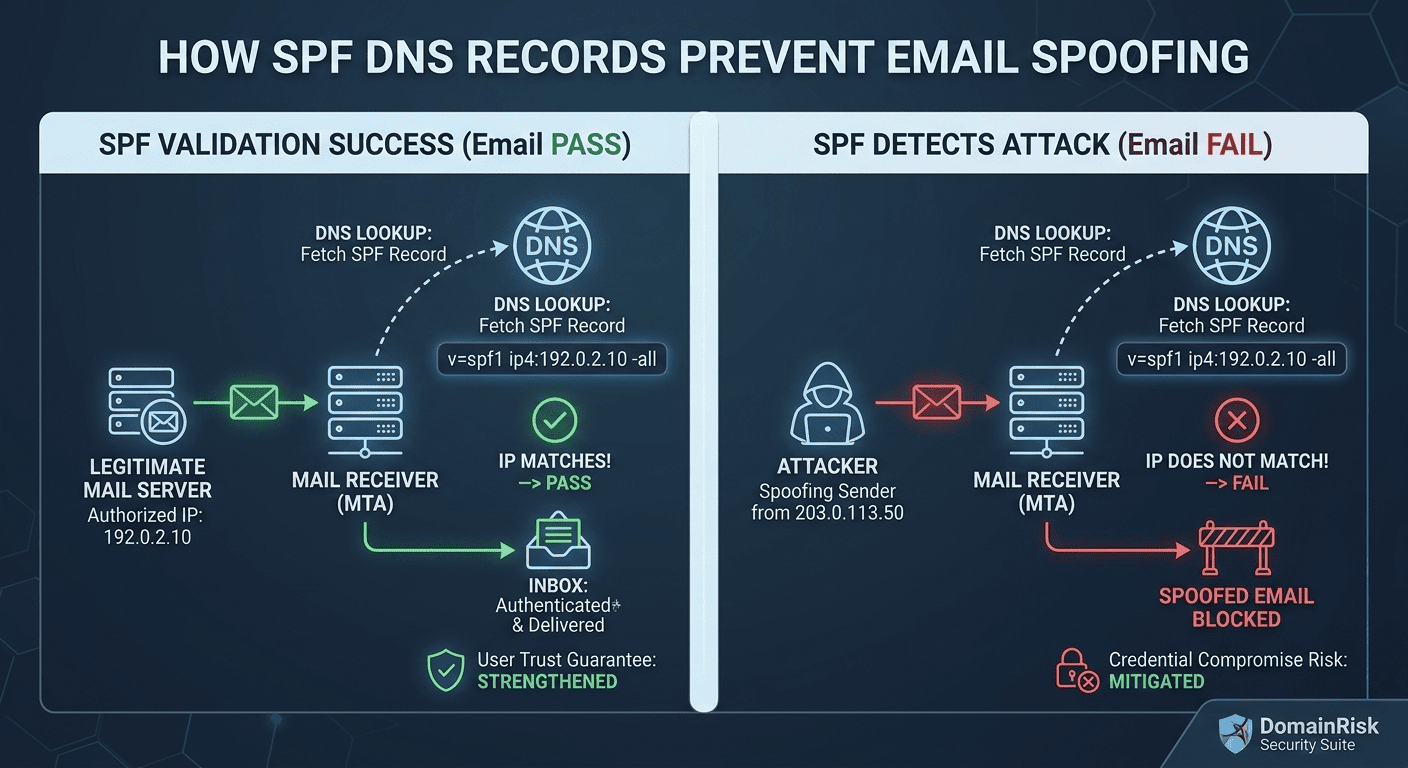
1What is SPF?
SPF (Sender Policy Framework) is an email authentication protocol defined in RFC 7208 (April 2014). It allows a domain owner to declare, via a single DNS TXT record, which mail servers are authorised to send email on behalf of that domain. When a receiving server gets an inbound message, it checks the SPF record of the sending domain and decides whether to accept, flag or reject it.
SPF was the first widely-deployed email authentication standard. It is a prerequisite for DMARC and works alongside DKIM to form the email authentication triad that modern mailbox providers — Gmail, Outlook, Yahoo — rely on to filter spam and phishing at scale.
- Sender authorisation.It creates an allowlist of IP addresses and mail servers permitted to send email from your domain.
- Envelope-level check.SPF validates the envelope sender (the
MAIL FROM/ Return-Path address used during the SMTP handshake), not theFrom:header visible to the recipient. DMARC bridges this gap with alignment checks. - DMARC dependency.An SPF pass alone is insufficient for full protection. Without DMARC, a passing SPF result on the envelope domain does not prevent a different address being spoofed in the visible
From:header — the field users actually see.
SPF is published as a single DNS TXT record at your apex domain (e.g. yourdomain.com). Only one SPF record is allowed per domain. If you have two, the result is a permerror — a permanent failure that causes DMARC to fail for every single message.
2Why "SPF Missing or Misconfigured" is a Critical Finding
A missing SPF record and a broken SPF record are equally dangerous.
No record means no authorisation check at all. A permerror (caused by duplicate records or exceeding the lookup limit) is treated as a fail by DMARC — silently blocking your legitimate email while doing nothing to stop spoofing.
Your domain is open to spoofing
Without SPF, any SMTP server on the internet can use your domain in the MAIL FROM envelope. Phishing toolkits actively scan for domains with missing or soft SPF policies and exploit them for large-scale impersonation campaigns. Your customers, partners and employees are the targets.
Deliverability damage for legitimate email
Gmail, Outlook and Yahoo treat an SPF fail or permerror as a strong negative signal. Transactional email, password resets and sales outreach from an SPF-broken domain are routed to spam or silently dropped before reaching the inbox.
Compliance gap — documented and auditable
PCI-DSS 4.0 Requirement 5.4, SOC 2 Type II CC6.6, ISO 27001 A.13.2 and Google/Yahoo's 2024 bulk sender requirements all mandate SPF. A missing or broken SPF record is an auditable control failure that surfaces in penetration tests and vendor security questionnaires.
DMARC cannot function without SPF
DMARC requires at least one passing authentication mechanism — SPF or DKIM — with domain alignment. A broken SPF record removes one of the two pillars that DMARC relies on. If DKIM is also absent or misaligned, every message will fail DMARC regardless of its origin.
3How SPF Works — the Lookup Chain
Understanding the SPF evaluation process is essential for diagnosing failures. The check happens entirely on the receiving mail server, in real time, during the SMTP connection.
The sending server connects
Your outgoing mail server (or a third-party service like SendGrid) opens a TCP connection to the recipient's mail server and issues a SMTP EHLO/HELO handshake.
MAIL FROM is declared
The sending server declares the envelope sender address — the Return-Path — with a MAIL FROM command. This is the domain SPF will check. It is often different from the visible From: header.
Receiving server queries DNS
The receiving MTA extracts the domain from MAIL FROM and queries DNS for a TXT record starting with v=spf1 at that domain. This is the first DNS lookup.
Mechanisms are evaluated left to right
The SPF record is parsed and each mechanism is evaluated in order. The first mechanism that matches the sender's IP address terminates evaluation and returns a result. If none match, the all mechanism applies.
A result is returned
SPF returns one of seven possible results: Pass, Fail, SoftFail, Neutral, None, TempError or PermError. Only Pass indicates the sender is authorised.
DMARC uses the result
The SPF result is passed to DMARC evaluation. DMARC additionally checks that the SPF-authenticated domain aligns with the visible From: domain. A pass with misalignment still fails DMARC.
The seven possible SPF results and what each means for delivery:
| Result | Meaning | Typical outcome |
|---|---|---|
Pass | The sender IP is explicitly authorised. | Delivered — good |
Fail | The sender IP is explicitly not authorised (triggered by -all). | Rejected or spam |
SoftFail | The sender is probably not authorised (~all). A hint, not an enforcement. | Usually delivered — weak |
Neutral | No assertion is made (?all). Treated like no SPF record. | Delivered — useless |
None | No SPF record exists at the domain. | Delivered — no protection |
TempError | Transient DNS error during lookup. Receivers may retry or defer. | Deferred — usually temporary |
PermError | Permanent error — duplicate records, malformed syntax or >10 lookups. | Treated as fail by DMARC |
SPF checks the envelope domain, not what users see
SPF validates the MAIL FROM (Return-Path) domain. An attacker can pass SPF on their own domain while spoofing a completely different domain in the visible From: header. This is why DMARC alignment is essential — it requires the SPF-authenticated domain to match the From: domain.
4The SPF Record Syntax
An SPF record is a single DNS TXT record at your apex domain. It always starts with v=spf1 and ends with an all mechanism. Here is a realistic example for a domain using Google Workspace, SendGrid and a custom mail server:
v=spf1 include:_spf.google.com include:sendgrid.net ip4:203.0.113.10 -allEach component of the record has a specific purpose. Understanding them prevents the most common misconfigurations:
| Mechanism | DNS lookups | Description |
|---|---|---|
include: | 1 per entry | Delegates authorisation to another domain's SPF record. Used to add third-party senders (Google, SendGrid, etc.). Each include: costs one lookup and may itself trigger further lookups. |
ip4: | 0 | Directly authorises an IPv4 address or CIDR range (e.g. ip4:203.0.113.0/24). Consumes no DNS lookups — prefer this for known static IPs. |
ip6: | 0 | Directly authorises an IPv6 address or CIDR prefix. Also consumes no DNS lookups. |
a | 1 | Authorises the IP addresses returned by a DNS A/AAAA lookup on the current domain (or a specified domain). Useful for domains that send from their own web server. |
mx | 1 + N | Authorises all IPs listed in the domain's MX records. Costs one lookup plus one per MX host. Avoid for large MX configurations. |
exists | 1 | Passes if a given domain resolves to any A record. Used for advanced dynamic authorisation scenarios — rarely needed. |
redirect= | 1 | Replaces the entire SPF record with another domain's record. Used to centralise SPF management. Cannot be used alongside all. |
all | 0 | Catch-all mechanism. Always matches. The qualifier (-, ~, ?, +) before all determines the result for any sender not matched by earlier mechanisms. |
Every mechanism can be prefixed with a qualifier that changes its result when it matches:
+allPass
Authorised (default — omitting qualifier is the same as +)
-allFail
Not authorised — reject
~allSoftFail
Probably not authorised — accept but flag
?allNeutral
No assertion — treat as no SPF record
5The all Mechanism: The Most Dangerous Tag
The all mechanism is the single most consequential tag in your SPF record.
It determines what happens to every sender that does not match any earlier mechanism. The wrong qualifier here makes the rest of your record completely irrelevant from a security perspective.
+allNEVER useAuthorises every IP address on the internet to send email as your domain. Your SPF record becomes actively worse than having no record at all. This is occasionally seen in misconfigured legacy records.
?allAvoidReturns Neutral for all unmatched senders. Treated the same as having no SPF record by most receivers — provides zero protection.
~allInsufficient aloneReturns SoftFail. Messages from unauthorised servers are accepted but may be marked as suspicious. This is the correct starting point during initial rollout, but must not be the permanent state for domains under active use.
-allRequired for enforcementReturns Fail. Messages from any server not listed in your SPF record are rejected. This is the only value that provides actual protection and is required for full DMARC enforcement.
The correct production target is -all. Use ~all only during the initial monitoring phase to avoid accidentally blocking legitimate senders before all sources have been identified. Once you have a complete list of authorised senders and a DMARC record at p=quarantine or p=reject, switch to -all.
6Step-by-Step Implementation Guide
Inventory every service that sends email from your domain
Create a complete list before touching DNS. Include: primary mail provider (Google Workspace, Microsoft 365, Zoho), transactional email (SendGrid, Postmark, Mailgun, Amazon SES, Brevo), marketing platforms (Mailchimp, HubSpot, Klaviyo, ActiveCampaign), CRM systems, helpdesk tools, and any self-hosted or cloud SMTP servers. Missing a single authorised sender from this list will cause its email to fail SPF once you publish -all.
Check whether an SPF record already exists
Run dig TXT yourdomain.com or use an online SPF checker. Look for any TXT record beginning with v=spf1. If you find more than one, you already have a permerror condition that must be fixed immediately — merge them into a single record. Never publish two SPF records.
Draft your SPF record using include: and ip4: mechanisms
For each sending service, find the correct include: value in the provider's documentation. Use ip4: for any mail server with a static IP address — it costs zero DNS lookups and is the most reliable mechanism. Keep a running count of DNS-lookup-consuming mechanisms as you build the record.
Publish with ~all and verify resolution
Publish your record as a single TXT entry at your apex domain with a ~all tail. Wait for DNS propagation (typically 5-30 minutes). Verify with dig TXT yourdomain.com or an SPF validator. Confirm there is exactly one record and that it parses without errors.
Send test messages and check headers
Send email from each service to a test inbox and examine the Authentication-Results header. Confirm each service shows spf=pass. Any service showing spf=fail or spf=neutral is missing from your record.
Switch to -all once all senders pass
Once every authorised service consistently returns spf=pass, update your record to -all. This is the enforcement step. Do it in coordination with your DMARC rollout — ideally at the same time you move DMARC from p=none to p=quarantine.
7The 10 DNS Lookup Limit — and How to Fix It
RFC 7208 hard limit: maximum 10 DNS-lookup-consuming mechanisms per SPF record.
Exceeding this limit produces a permerror result. DMARC treats permerror as a fail. Every single message from your domain will fail DMARC until you fix the lookup count — including completely legitimate email.
The following mechanisms each count as one DNS lookup: include:, a, mx, exists, redirect=. The include: mechanism recursively counts the lookups inside the referenced record too. A single include:sendgrid.net costs 1 lookup — but sendgrid's own record might internally reference 3 more, bringing the total to 4.
Example — a common record that exceeds the limit:
v=spf1 include:_spf.google.com include:sendgrid.net include:spf.protection.outlook.com include:mailgun.org include:amazonses.com include:spf.mandrillapp.com include:servers.mcsv.net include:mktomail.com include:_spf.salesforce.com include:hubspotemail.net -all10 include: entries — plus recursive lookups inside each = permerror
Solutions for exceeding the limit:
SPF Flattening
Replace all include: entries with the raw IP addresses they resolve to. This reduces the lookup count to zero for those entries. The downside: the IPs must be updated whenever the provider changes their infrastructure. Use a managed flattening service (AutoSPF, dmarcly, EasyDMARC) to automate this.
Consolidate Sending Services
Audit whether all included services are still actively used. It is common for abandoned integrations to remain in SPF records for years. Remove any service that no longer sends email from your domain — each removal saves one or more lookups.
Use ip4: for Static IPs
For any mail server whose IP address you control and which is unlikely to change, replace the include: or a mechanism with a direct ip4: entry. It costs zero lookups.
Centralise via Subdomain Delegation
Use the redirect= modifier to point your apex domain's SPF to a managed subdomain record where you control the full chain. This is one record at the root and allows deeper management beneath it.
8Common Mistakes to Avoid
Publishing two SPF records
Only one TXT record starting with v=spf1 is permitted. If you have two — from a migration, a provider addition or a miscommunication — every single SPF evaluation returns permerror. Combine all mechanisms into a single record.
Using +all or ~all in production
+all grants the entire internet permission to send as your domain. ~all (SoftFail) provides visibility but zero enforcement. The only acceptable production qualifier is -all. Anything else is a live misconfiguration.
Adding a sender after the fact
When your team adopts a new email tool and someone adds its include: without checking the existing record, you may silently push the lookup count past 10. Always audit the total lookup count whenever you add or remove a mechanism.
Forgetting subdomains
SPF records at the apex domain do not automatically protect subdomains. If you send email from mail.yourdomain.com or no-reply.yourdomain.com, each subdomain needs its own SPF record — or the subdomain policy in your DMARC record must be set appropriately.
Not testing after every DNS change
A DNS change to an existing include: provider's infrastructure can silently break your SPF without you touching anything. Use scheduled SPF health monitoring (or DomainRisk.io continuous scans) to detect this automatically.
Relying on SPF without DMARC
SPF alone does not protect the From: header — the field users actually see. Without DMARC to enforce alignment, an attacker can use a domain they control to pass SPF while displaying your domain in the From: field. SPF is only fully effective when paired with DMARC.
Using mx mechanism for large MX sets
The mx mechanism resolves all MX records and their A records. On domains with many MX hosts this can consume several lookups and is fragile when MX infrastructure changes. Use ip4: for explicit mail servers instead.
Leaving parked domains without SPF
Domains that never send email are prime spoofing targets. Publish v=spf1 -all on every domain you own that does not send mail. This tells receivers to reject all email from that domain, immediately.
9Verifying Your Record with DomainRisk.io
After publishing or updating your SPF record, trigger a new scan in DomainRisk.io. The email authentication sub-score updates immediately once the scan completes and DNS propagation is confirmed.
The TXT record at your apex domain resolves correctly, starts with v=spf1 and contains exactly one record.
DomainRisk.io recursively counts DNS lookups across all include: references and flags records that are at risk of exceeding the 10-lookup limit.
The qualifier on the all mechanism is evaluated: -all is scored as compliant, ~all is flagged as medium severity, +all or missing is flagged as critical.
SPF breaks silently — monitor continuously
Your SPF record can break without you touching it. A third-party mail provider can add a new internal include: that pushes your recursive lookup count past 10. A provider migration can cause an existing include: to stop resolving. DomainRisk.io checks your SPF on every scheduled scan and alerts you the moment a change or regression is detected — before it affects deliverability.
✓Key Takeaways
SPF authorises sending servers at the envelope level. Without it — or with +all — your domain is freely spoofable by anyone on the internet.
A permerror from duplicate records or exceeding the 10-lookup limit is treated as a fail by DMARC. It silently blocks all your legitimate email until resolved.
The only acceptable production qualifier is -all. Never deploy +all. Use ~all only during initial monitoring before all senders are identified.
SPF alone does not protect the From: header. You must pair it with DMARC (with alignment enabled) to prevent display-name spoofing.
Inventory every service that sends email from your domain before publishing -all. One missing sender means lost email.
Use ip4: for static IPs to avoid consuming DNS lookups. If you exceed 10 lookups, flatten your record or consolidate senders immediately.
Parked domains that send no email should publish v=spf1 -all immediately — they require no monitoring phase.
Monitor your SPF record continuously. Third-party provider changes can silently push you past the 10-lookup limit without warning.
Continue reading
DKIM Explained: How Cryptographic Signing Proves Your Emails Are Genuine
Add the cryptographic layer — the signature that survives email forwarding and proves your messages have not been altered in transit.
Read the guideEmail SecuritySecuring Domain Integrity: A Guide to Implementing DMARC for Compliance
Enforce your SPF and DKIM results with a DMARC policy — the final layer that stops domain spoofing and delivers aggregate reporting.
Read the guide