1What Is BIMI and Why It Matters
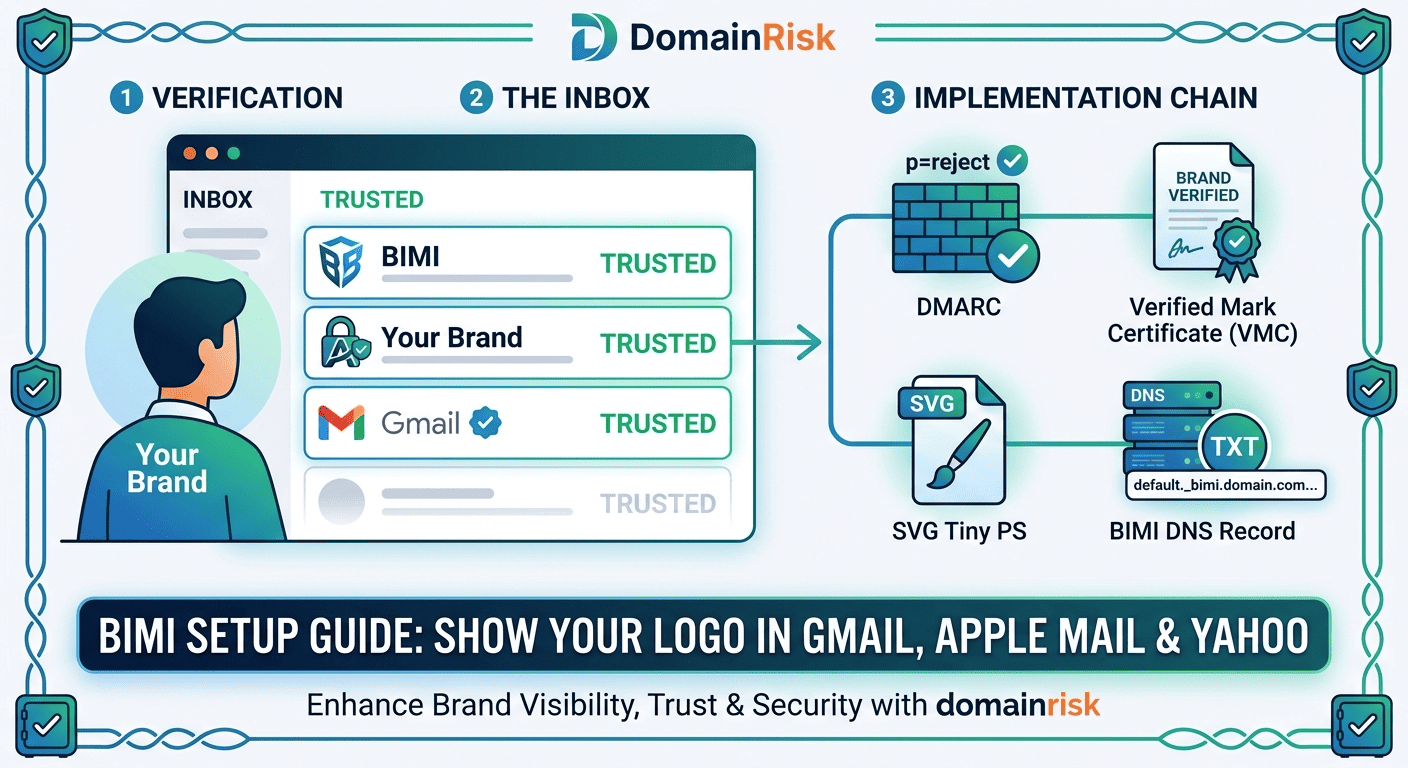
BIMI (Brand Indicators for Message Identification) is an email standard that allows domain owners to associate a verified brand logo with outgoing email. When a message passes strict email authentication checks, supporting mail clients retrieve the logo from a URL published in DNS and display it next to the sender's name — before the recipient opens the message.
The standard is published as a DNS TXT record atdefault._bimi.yourdomain.com. It points to a hosted SVG file containing your logo, and optionally to a Verified Mark Certificate (VMC) that cryptographically authenticates the logo ownership. Mail clients that support BIMI — currently Gmail, Apple Mail, Yahoo Mail and Fastmail — perform this lookup and render the logo automatically.
- Visual trust signal.Recipients see your verified logo in the inbox list, making your messages instantly recognisable and harder to impersonate at a glance.
- Anti-phishing layer.Attackers spoofing your domain cannot display the BIMI logo — their messages fail DMARC and the logo is never retrieved. Over time, users learn to expect the logo and distrust messages without it.
- Measurable engagement lift.Studies from the BIMI Group and email marketing platforms consistently report 10–15% higher open rates for authenticated BIMI senders compared to non-BIMI senders in the same segments.
- Security maturity signal.BIMI can only be deployed on a domain that already has DMARC at enforcement level. It is therefore a reliable proxy for the overall email security posture of a domain — which is why it features in domain security scoring.
2How BIMI Works — The Technical Chain
BIMI sits at the end of the email authentication chain. It is not a standalone control — it is a reward for having all the upstream controls in place. Here is the full sequence from send to logo display:
The sending domain publishes a DMARC record at enforcement level
The sending domain must have a DMARC policy of p=quarantine or p=reject. A p=none record is insufficient — BIMI explicitly requires that unauthenticated messages are actively filtered, not just monitored. This prerequisite ensures BIMI is only accessible to domains that have completed the full email authentication stack.
The message passes DMARC authentication
When the recipient's mail server receives the message, it evaluates DMARC — checking that SPF or DKIM (or both) pass with alignment against the visible From: domain. If DMARC passes, the server knows the message genuinely originated from the claimed domain. If DMARC fails, the BIMI lookup is skipped entirely.
The receiving server queries the BIMI DNS record
On a successful DMARC pass, the mail server performs a DNS TXT lookup at default._bimi.sender-domain.com. The record contains the URL of the SVG logo file, and optionally the URL of a VMC certificate. If no BIMI record exists, the process stops here and no logo is displayed.
The SVG logo file is fetched over HTTPS
The mail server (or the mail client, depending on implementation) fetches the SVG file from the URL specified in the l= tag of the BIMI record. The file must be served over HTTPS without redirects, with the correct MIME type, and must conform to the SVG Tiny PS 1.2 profile. Any deviation causes the fetch to fail silently.
The VMC is verified (Gmail only)
For Gmail, the server also fetches the PEM-encoded Verified Mark Certificate from the a= URL and verifies it against the issuing CA (Entrust or DigiCert). The VMC proves that the logo is the registered trademark of the domain owner. Without a valid VMC, Gmail will not display the logo. Apple Mail, Yahoo and Fastmail do not require a VMC.
The logo is rendered in the inbox
If all checks pass, the mail client renders the logo in the sender avatar position — the circular or square icon next to the sender's name in the inbox list. On mobile, this is particularly visible. The logo persists across threads, making the sender immediately identifiable at a glance.
DMARC at p=quarantine or p=reject is a hard prerequisite.
You cannot implement BIMI on a domain withp=noneor no DMARC record. If your domain is not yet at enforcement level, start with theDMARC implementation guidebefore attempting BIMI.
3BIMI DNS Record — Syntax & Examples
The BIMI record is a single DNS TXT record published atdefault._bimi.yourdomain.com. Thedefault selector is the standard entry point used by all current BIMI-supporting mail clients.
Full record — with VMC (required for Gmail):
v=BIMI1; l=https://yourdomain.com/bimi-logo.svg; a=https://yourdomain.com/bimi-vmc.pemMinimal record — without VMC (Apple Mail, Yahoo, Fastmail):
v=BIMI1; l=https://yourdomain.com/bimi-logo.svg;| Tag | Required | Description |
|---|---|---|
v= | Yes | Version identifier — always BIMI1. Must be the first tag in the record. |
l= | Yes | URL of the SVG logo file. Must be an absolute HTTPS URL. No HTTP, no redirects. An empty l= value (l=;) signals that the domain intentionally opts out of BIMI display. |
a= | Recommended | URL of the PEM-encoded Verified Mark Certificate. Required for Gmail to display the logo. If omitted, Apple Mail, Yahoo and Fastmail may still show the logo without verification. |
Common DNS and hosting errors
SVG served over HTTP
The l= URL must use HTTPS. An HTTP URL is rejected outright — no fallback, no warning. Make sure your SVG hosting has a valid TLS certificate and is not served from a plain HTTP endpoint.
Redirect in the SVG path
BIMI fetchers follow the l= URL directly and do not follow HTTP redirects. If your CDN or web server redirects the SVG URL (e.g. from /logo to /logo.svg), BIMI will fail. Use the final canonical URL.
Wrong SVG profile
BIMI requires the SVG Tiny PS 1.2 profile — not standard SVG 1.1 or SVG 2. A logo exported from Illustrator, Figma or Inkscape as a standard SVG will typically fail. Use a dedicated BIMI SVG converter or the BIMI Group validator.
DMARC not at enforcement level
Publishing a BIMI record on a domain where DMARC is at p=none has no effect. Mail clients check DMARC enforcement before querying BIMI. No enforcement = no logo display, regardless of what is in DNS.
4VMC — Do You Really Need One?
AVerified Mark Certificate (VMC) is a specialised X.509 digital certificate issued by an accredited CA — currently Entrust or DigiCert. It embeds your trademarked logo in its payload and cryptographically binds it to your domain, proving to mail clients that the logo is the registered intellectual property of the domain owner. The certificate is published as a PEM file at a URL referenced by thea= tag in your BIMI record.
VMC costs approximately $1,000–$1,500 per year and requires a registered trademark.
Entrust and DigiCert both require that your logo is a registered trademark in a major trademark office (USPTO, EUIPO, IPO, or equivalent) before they issue a VMC. The validation process involves submitting your trademark registration number and undergoing identity verification — typically 1–4 weeks.
| Mail Client | BIMI Support | VMC Required? | Notes |
|---|---|---|---|
| Gmail | Full | Yes | Requires both a valid BIMI record and a VMC. Without VMC, the logo is not displayed. |
| Apple Mail (iOS & macOS) | Full | No | Displays the logo without a VMC. The SVG is fetched directly from the l= URL. |
| Yahoo Mail | Full | No | Displays the logo without a VMC. One of the earliest adopters of the standard. |
| Fastmail | Full | No | Displays the logo without a VMC for authenticated senders. |
| Outlook / Microsoft 365 | None | No | Microsoft has announced BIMI support but has not yet enabled it as of April 2026. Monitor the BIMI Group working group for updates. |
When to get a VMC — and when to skip it
If your email volume is primarily B2C and Gmail is a significant portion of your recipient base, the VMC investment is justified. Gmail accounts for roughly 30% of global email client market share, and logo display in Gmail inbox dramatically increases brand recall for high-frequency senders (e-commerce, SaaS, fintech).
If your primary audience uses Apple devices (iCloud Mail, Apple Mail on iOS/macOS), you can get BIMI logo display across that entire segment with no VMC required. A no-VMC BIMI deployment still covers Apple Mail, Yahoo and Fastmail — which collectively represent a significant share of consumer inboxes.
5Step-by-Step BIMI Implementation
Before you start
Confirm you have all three email authentication standards deployed and passing:SPF,DKIM, andDMARC at p=quarantine or p=reject. BIMI will silently do nothing until all three are in place.
Verify DMARC enforcement
Run a DNS lookup for _dmarc.yourdomain.com and confirm that the p= tag is set to quarantine or reject. Confirm that your SPF pass rate and DKIM signing rate are both above 95% in your DMARC aggregate reports before proceeding. Any significant failure rate in your upstream authentication will undermine BIMI display.
Prepare the SVG logo in Tiny PS 1.2 format
BIMI requires the SVG Tiny Portable/Secure (Tiny PS) 1.2 profile — a restricted subset of SVG that excludes scripts, external resources and animation. Export your logo from your design tool as SVG, then process it with the BIMI Group's online SVG converter or a tool like svgo combined with the bimi-svg-validator package. Key requirements: square aspect ratio (1:1), no embedded raster images, viewBox attribute present, title element present with your brand name.
Host the SVG on HTTPS without redirects
Upload the processed SVG file to a publicly accessible HTTPS URL. The URL must return the file directly — no 301 or 302 redirects, no authentication prompts. Set the Content-Type response header to image/svg+xml. Test with curl -I https://yourdomain.com/bimi-logo.svg and verify you get a 200 OK with the correct Content-Type header.
(Optional) Obtain a VMC from Entrust or DigiCert
Required for Gmail logo display. Start by confirming your logo trademark registration is active in an accepted trademark office. Submit your trademark number, domain ownership verification, and the processed SVG file to Entrust (entrust.com/VMC) or DigiCert (digicert.com/tls-ssl/verified-mark-certificates). The certificate is issued as a PEM file. Host it at an HTTPS URL without redirects — the same hosting requirements as the SVG file apply.
Publish the BIMI DNS record
Create a TXT record at default._bimi.yourdomain.com. Set the value to v=BIMI1; l=https://yourdomain.com/bimi-logo.svg; and append a=https://yourdomain.com/bimi-vmc.pem; if you have a VMC. DNS propagation typically takes 5–30 minutes. Verify with: dig TXT default._bimi.yourdomain.com
Validate with a BIMI checker
Use the BIMI Group's official checker at bimigroup.org/bimi-generator to validate your full implementation. The tool checks: DMARC policy level, BIMI record syntax, SVG accessibility and format compliance, and VMC validity if present. Gmail also has an internal cache — new BIMI records can take up to 24 hours to appear in Gmail inboxes even after validation.
6How BIMI Affects Your Domain Security Score
Indomain security scoring, BIMI is evaluated as ahardening signal within the email authentication axis— not a critical control, but a meaningful indicator of security maturity. A domain with BIMI deployed has, by definition, already satisfied the hardest prerequisites: functioning SPF, DKIM, and DMARC at enforcement level. That combination has significant weight in the email security sub-score.
DomainRisk.io confirms DMARC is at quarantine or reject — the prerequisite gate that BIMI itself requires. This is scored independently as a critical control.
The presence of a valid default._bimi. TXT record with a reachable l= URL contributes positively to the hardening score. A syntactically invalid record or an unreachable SVG URL is flagged.
A valid a= URL pointing to a resolvable PEM certificate is recorded as an additional hardening indicator — reflecting the highest level of verified email brand authentication.
Check if your domain is BIMI-ready
DomainRisk.io verifies all BIMI prerequisites — DMARC enforcement, SPF pass rate, DKIM signing — and flags any gaps preventing deployment. Free scan, results in under 60 seconds.
Scan my domain — it's free7BIMI vs No BIMI — Impact on Trust & Deliverability
The inbox is the first point of contact between your brand and your recipient. What they see before opening your email shapes whether they open it at all — and whether they trust it.
Without BIMI
- Generic avatar — initials or a grey placeholder icon is shown next to the sender name
- No visual differentiation from hundreds of other senders in the inbox
- Phishing messages using your domain look identical to your legitimate messages
- Open rate relies entirely on subject line and sender name recognition
- Recipients cannot verify the email is from the real brand before opening
With BIMI
- Verified brand logo displayed in the inbox list before the message is opened
- Instant brand recognition — consistent across Gmail, Apple Mail, Yahoo and Fastmail
- Phishing attempts using your domain display no logo — recipients learn to notice the difference
- 10–15% higher open rates reported across B2C and transactional email programs
- VMC-backed logo shows a checkmark in Gmail, explicitly signalling verified sender identity
The anti-phishing effect is a trained response, not just a technical control
BIMI's security value compounds over time. As recipients see your logo consistently on every legitimate message, they develop a subconscious association between the logo and trustworthy email from your brand. When a phishing message arrives without the logo — because it fails DMARC and never triggers the BIMI lookup — the absence of the logo is itself a red flag for trained recipients. This is the same principle behind browser padlock indicators: the absence is more meaningful after users have learned to expect the presence.
BIMI is a deliverability signal, not just a display feature
Gmail's internal reputation systems use BIMI compliance as a positive signal for sender reputation scoring. Domains with BIMI deployed — and therefore confirmed DMARC enforcement, consistent authentication, and trademark verification — tend to see modest but measurable improvements in inbox placement rates compared to identical sending volumes without BIMI. The effect is strongest for new senders building reputation from zero.
✓Key Takeaways
BIMI requires DMARC at p=quarantine or p=reject. It cannot be deployed on a domain at p=none or without a DMARC record. Fix the foundation first.
The SVG logo must conform to the SVG Tiny PS 1.2 profile — not standard SVG. Use the BIMI Group validator before publishing the DNS record.
The SVG must be hosted at an absolute HTTPS URL that returns a 200 OK directly, with the correct Content-Type header and no redirects.
A VMC is required for Gmail logo display. Apple Mail, Yahoo Mail and Fastmail will display the logo without a VMC.
VMCs cost approximately $1,000–$1,500 per year and require a registered trademark. Plan the trademark validation process into your timeline — it can take 1–4 weeks.
The BIMI DNS record is published at default._bimi.yourdomain.com as a TXT record. The default selector is the only selector currently supported by mail clients.
BIMI is both a security control and a marketing lever. The anti-phishing effect compounds as recipients learn to associate the logo with verified identity.
Validate your full implementation with the BIMI Group checker before announcing it. Gmail may take up to 24 hours to display a newly published logo due to internal caching.
Monitor your BIMI record continuously — changes to your DMARC policy, SVG hosting, or VMC expiry will silently break logo display without any bounce or error notification.
Prerequisites covered in these guides
Securing Domain Integrity: A Guide to Implementing DMARC
Reach p=quarantine or p=reject — the mandatory foundation for BIMI deployment.
Read the guideEmail SecuritySPF Explained: How One DNS Record Stops Spoofing
Configure the SPF record that authorises your sending servers — the first DMARC pillar.
Read the guideEmail SecurityDKIM Explained: How Cryptographic Signing Proves Your Emails Are Genuine
Add the cryptographic signature layer that makes DMARC resilient under forwarding — the second DMARC pillar.
Read the guide