1What Is DNSSEC and What Problem Does It Solve?
DNSSEC (Domain Name System Security Extensions) is a suite of IETF standards — principallyRFC 4033–4035— that add cryptographic authentication to DNS responses. It allows a validating resolver to verify that the DNS data it receives has not been tampered with in transit and genuinely originates from the authoritative zone for that domain.
The core problem: DNS was designed in 1983 with no authentication.
The original DNS protocol (RFC 882, 1983) assumes the network is trusted. There is no mechanism to verify that a DNS response actually comes from the legitimate authoritative server, or that it has not been modified between the server and the resolver. Any attacker with a position on the network path — or on a shared caching resolver — can inject forged DNS responses.
DNS cache poisoning works by injecting a forged response into a caching resolver before the legitimate answer arrives. Once poisoned, every client using that resolver receives the malicious answer — redirected to a server the attacker controls — until the cache TTL expires. The attack is invisible to end users: their browser shows the correct domain name in the address bar.
What DNSSEC does
- Cryptographically signs every DNS record in the zone
- Allows resolvers to verify data integrity and origin authenticity
- Detects and rejects tampered or forged DNS responses
- Provides authenticated denial of existence for missing records
- Creates a verifiable chain of trust from the DNS root to your domain
What DNSSEC does NOT do
- Encrypt DNS queries or responses — traffic is still in plaintext
- Provide privacy for DNS lookups (use DNS-over-HTTPS for that)
- Protect against vulnerabilities in the DNS server software itself
- Guarantee the security of the destination server or application
- Replace TLS/HTTPS — it secures the lookup, not the connection
2How DNSSEC Works — The Chain of Trust
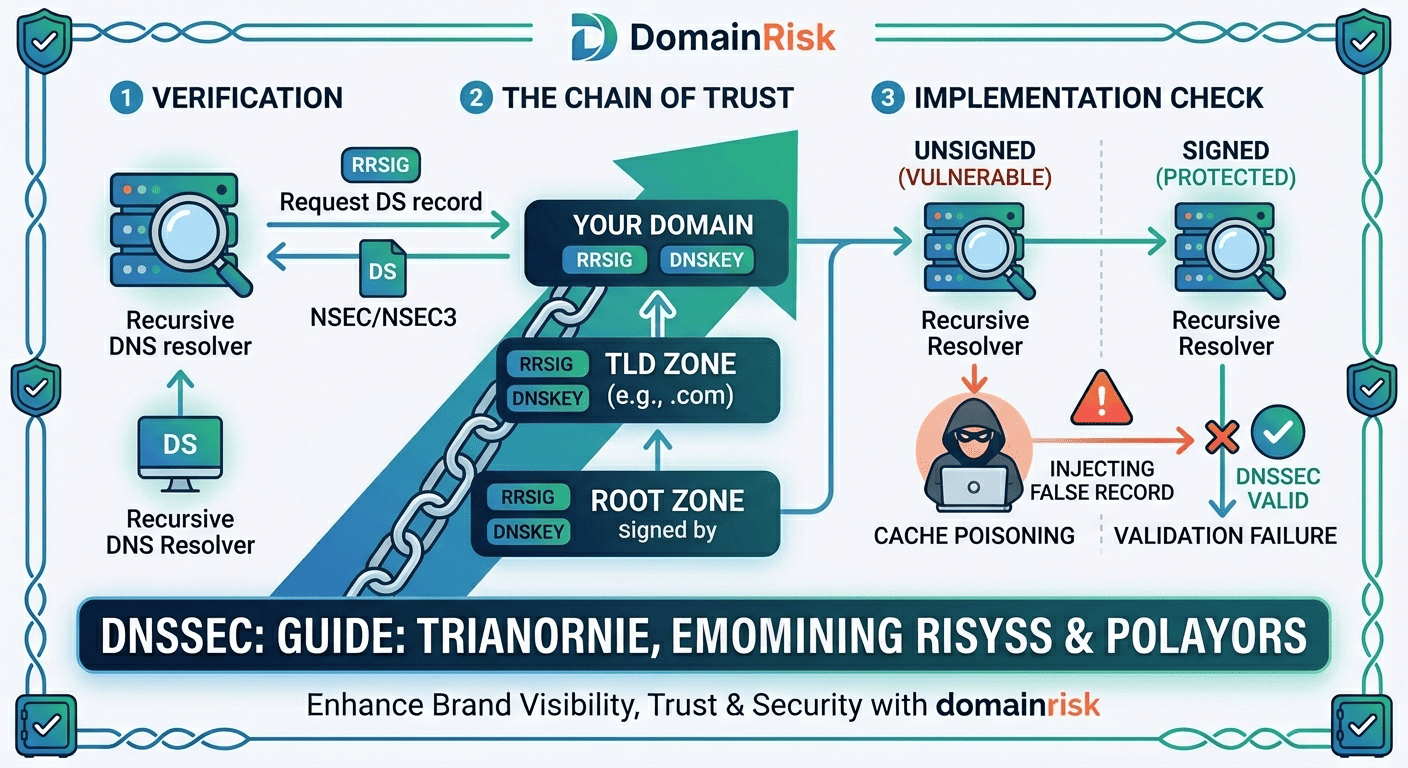
DNSSEC uses asymmetric cryptography. Each zone holds a private key used to sign its records. The corresponding public key is published in DNS itself. Validity is established by tracing a chain of trust from the DNS root — whose trust anchor is hardcoded into validating resolvers — down through each TLD to your domain.
The four DNSSEC record types
| Record | Purpose |
|---|---|
RRSIG | Resource Record Signature. Every signed DNS record in the zone has an RRSIG counterpart containing the cryptographic signature for that record set. The resolver uses this to verify the record has not been tampered with. |
DNSKEY | Published in the zone apex, it contains the public key(s) used to verify the zone's RRSIG signatures. There are two key types: the Zone Signing Key (ZSK), which signs individual records, and the Key Signing Key (KSK), which signs the DNSKEY record set itself. |
DS | Delegation Signer. Published in the parent zone (e.g. the TLD), it contains a hash of the child zone's KSK. It is the link in the chain of trust — the parent vouches for the child's key. Without a DS record in the parent, DNSSEC validation cannot be completed. |
NSEC / NSEC3 | Next Secure. Provides authenticated denial of existence: a signed proof that a queried name does not exist. NSEC3 adds hashing to prevent zone enumeration (walking through all records by following NSEC chains). |
Validation chain — from resolver to your domain
Root zone — the trust anchor
Every DNSSEC-validating resolver ships with the root zone's public Key Signing Key hardcoded as a trust anchor. ICANN publishes this key, and it is rotated approximately every 5 years (the last rollover was in 2018). The root KSK signs the root DNSKEY record set, establishing the top of the chain.
TLD zone — the DS record bridge
The root zone's Zone Signing Key signs the DS records for every TLD (.com, .net, .org, .io…). Each DS record contains a hash of the TLD's KSK. A resolver that trusts the root can therefore verify the TLD's key.
Your domain zone — the final link
The TLD zone (e.g. .io) contains a DS record for your domain, signed by the TLD's ZSK. This DS record hashes your domain's KSK. A resolver that has verified the TLD can verify your KSK, then use it to verify your DNSKEY record, then verify every RRSIG signature on every record in your zone.
Resolver validates the full chain
When a DNSSEC-validating resolver queries your domain, it traces the full chain: root KSK → root ZSK → TLD DS → your DS → your DNSKEY → your RRSIG → your record. If any link breaks — wrong DS hash, expired signature, missing record — the resolver returns SERVFAIL rather than the potentially forged answer.
KSK vs ZSK — why two keys?
The Key Signing Key (KSK) has a long lifetime and is referenced by the parent zone's DS record. Changing it requires coordinating with the parent zone operator — a slow process. The Zone Signing Key (ZSK) can be rotated frequently (monthly or quarterly) because it only requires updating the zone's own DNSKEY and RRSIG records. This two-key split allows regular key rotation without requiring a parent zone update every time.
3DNSSEC vs DNS — Concrete Attack Scenarios
DNS Cache Poisoning (Kaminsky Attack)
Discovered by Dan Kaminsky in 2008, this attack exploits the fact that DNS uses predictable transaction IDs and UDP port numbers. An attacker floods a caching resolver with forged responses, racing to inject a malicious answer before the legitimate response arrives. Once the cache is poisoned, every user of that resolver is redirected to the attacker's server for the duration of the TTL — typically hours or days.
Without DNSSEC: the resolver has no way to detect the forgery. It accepts whichever answer arrives first.With DNSSEC: the forged response carries no valid RRSIG. The resolver rejects it and returns SERVFAIL, refusing to serve a potentially malicious answer.
BGP Hijacking + DNS Spoofing
In 2018, attackers exploited a BGP route leak to hijack traffic destined for MyEtherWallet's DNS provider, redirecting users to a phishing server that stole approximately $150,000 in cryptocurrency. The attack worked because DNS responses from the hijacked authoritative server had no cryptographic validation — resolvers had no way to distinguish the attacker's responses from the legitimate ones.
DNSSEC would not have prevented the BGP hijack, but it would have made the DNS responsesunacceptable to validating resolvers— the attacker's server could not produce valid RRSIG signatures, so no validated client would have accepted the redirected answers.
On-Path DNS Interception
An attacker positioned between a client and its DNS resolver — through a compromised Wi-Fi access point, a rogue ISP, or a malicious exit node — can transparently modify DNS responses in flight. The client queries forbank.comand receives a response pointing to the attacker's server. The browser showsbank.com in the address bar — if the attacker has also obtained a fraudulent certificate, the padlock is green too. DNSSEC, combined with DoH or DoT to a validating resolver, eliminates this attack vector at the DNS layer.
4How to Check if Your Domain Has DNSSEC Enabled
The quickest check is a DNS query for the DS record in the parent zone. If a DS record exists, your domain is signed and the parent zone has accepted the delegation. If no DS record exists, DNSSEC is either not configured or the DS was never published to the parent.
Check via command line:
# Check for DS record in the parent zone (confirms DNSSEC is signed + delegated)
dig DS yourdomain.com @8.8.8.8

# Check for DNSKEY records in your zone (confirms the zone is signed)
dig DNSKEY yourdomain.com @8.8.8.8

# Request DNSSEC validation from the resolver (AD bit = Authenticated Data)
dig +dnssec A yourdomain.com @8.8.8.8| Status | What You See | What It Means |
|---|---|---|
| Signed & valid | DS record present, AD bit set in response | DNSSEC is fully configured. The zone is signed, the DS record is published in the parent, and a validating resolver confirms the chain of trust is intact. |
| Unsigned | No DS record, no RRSIG in responses | DNSSEC is not configured. The zone has no DNSSEC records and the parent has no DS record. The domain is vulnerable to DNS spoofing. |
| Bogus / broken | SERVFAIL from validating resolver, DNSViz shows errors | DNSSEC is partially configured but broken. Common causes: expired RRSIG signatures, DS hash mismatch, missing DNSKEY, or DS published before the zone was signed. A bogus domain is effectively unreachable from validating resolvers. |
Recommended validation tools
DNSViz (dnsviz.net)
Visual graph of the full DNSSEC chain — shows exactly where the chain breaks and why. The most comprehensive free tool for diagnosing DNSSEC issues.
Verisign DNSSEC Debugger
Simpler interface, highlights signing status and DS delegation state for a domain. Good for a quick pass/fail check.
ICANN DNSSEC Analyser
Official ICANN tool at dnssec-analyzer.verisignlabs.com — structured pass/fail report for each zone in the chain.
DomainRisk.io
Checks DNSSEC signing status, DS delegation and chain validity as part of the full domain security scan — no command line required.
5How to Enable DNSSEC — Step by Step
A misconfigured DNSSEC deployment makes your domain unreachable.
If the DS record in the parent zone does not match your zone's DNSKEY, every DNSSEC-validating resolver in the world will return SERVFAIL for all queries to your domain. Your website, email and all DNS-dependent services go dark. Always verify the full chain with DNSViz before and after each change. Never rush a DNSSEC deployment.
Before you start — verify support at both layers
DNSSEC requires support from two separate systems: yourdomain registrar(which publishes the DS record to the TLD) and yourauthoritative DNS provider(which signs the zone and generates the DNSKEY/RRSIG records). If your registrar and DNS host are the same company (Cloudflare, OVHcloud, Gandi), this is seamless. If they are separate (e.g. domain at Namecheap, DNS at an external provider), you will need to transfer the DS record manually.
Confirm your DNS provider supports DNSSEC signing
Log in to your authoritative DNS provider and check for a DNSSEC or Zone Signing option. Major providers with native DNSSEC support: Cloudflare (free, automatic), OVHcloud, Gandi, Amazon Route 53, Google Cloud DNS, Azure DNS. If your provider does not support DNSSEC, you will need to migrate your DNS to one that does before proceeding.
Enable DNSSEC signing on your DNS zone
In your DNS provider's control panel, enable DNSSEC for the zone. The provider will generate the ZSK and KSK key pairs, sign all existing records, and begin serving RRSIG and DNSKEY records. On Cloudflare, this is a single toggle switch. On Route 53, it is a one-click action from the Hosted Zone detail page. The zone is now signed — but not yet trusted, because no DS record exists in the parent yet.
Retrieve the DS record data from your DNS provider
After enabling signing, your DNS provider will display the DS record data you need to submit to your registrar. It typically contains four values: key tag (a short integer), algorithm number (e.g. 13 for ECDSA P-256), digest type (e.g. 2 for SHA-256), and the digest hex string. Copy this exactly — a single character error will break the chain.
Submit the DS record to your registrar
Log in to your domain registrar and navigate to the DNSSEC or DS Records section for your domain. Enter the DS record values exactly as provided by your DNS provider. The registrar will publish the DS record to the TLD zone on your behalf. Common registrar paths: Cloudflare → DNS → DNSSEC tab; OVHcloud → domain → DNSSEC; Gandi → domain → DNS Records → DNSSEC; Namecheap → Advanced DNS → DNSSEC.
Wait for DS propagation and verify
DS record propagation to the TLD zone typically takes 15 minutes to 2 hours, depending on the registrar and TLD. After propagation, verify the full chain with DNSViz. Confirm: DS record present in parent zone, DNSKEY records present and matching, RRSIG records valid and not expired, and no broken links in the chain graph.
Monitor RRSIG expiry and key rotation
RRSIG signatures have an expiry date — typically 2 to 4 weeks for ZSK signatures. Your DNS provider should re-sign the zone automatically before expiry. Verify that automatic re-signing is enabled. If you manage your own BIND or PowerDNS instance, ensure the signing daemon (named or pdns_control) is running and configured for automatic rollover. An expired RRSIG is a common cause of silent DNSSEC breakage.
Common DNSSEC mistakes to avoid
Publishing DS before the zone is signed
Submitting the DS record to the registrar before your DNS provider has finished signing the zone creates an immediate outage: the parent points to a KSK that resolvers cannot find. Always confirm DNSKEY and RRSIG records are live in your zone before touching the registrar.
Changing DNS providers without updating DS
If you migrate DNS from one provider to another, the new provider generates a different KSK. The DS record in the parent still references the old key. Validating resolvers return SERVFAIL. Always disable DNSSEC at the registrar, migrate DNS, re-enable DNSSEC with the new provider, then re-submit the new DS record.
Not monitoring RRSIG expiry
RRSIG records expire. If your DNS provider stops auto-signing — due to a billing lapse, a configuration change, or a provider outage — your signatures will expire silently. Your domain appears unsigned to resolvers, or bogus if the expiry is recent enough that old signatures are cached. Set up monitoring for DNSSEC validity.
Assuming DNSSEC means DNS is private
DNSSEC provides authentication, not confidentiality. All DNS queries and responses remain in plaintext. Anyone on the network path can read which domains you query. For DNS privacy, use DNS-over-HTTPS (DoH) or DNS-over-TLS (DoT) to a trusted resolver — that is a separate and complementary control.
6DNSSEC Adoption — Where Things Stand in 2026
Despite being standardised in 2005 and the DNS root being signed since 2010, DNSSEC adoption among registered domains remains low. APNIC data consistently shows fewer than 25–30% of DNS queries being validated end-to-end, with signed domain rates varying widely by TLD. Understanding why adoption is slow is useful context for making the case internally.
~20–25%
of all registered .com domains have a DS record published (Verisign, 2025)
>90%
of .nl (Netherlands) domains are DNSSEC-signed — the highest rate of any major TLD
100%
of .gov (US federal) domains are required to have DNSSEC enabled under CISA BOD 18-01
NIS2 and DORA are accelerating European adoption
The NIS2 Directive (2022/2555/EU), effective October 2024, explicitly lists DNS resilience as a required security measure for essential and important entities. ENISA's technical guidelines reference DNSSEC as a recommended control. DORA (Digital Operational Resilience Act), applicable to EU financial entities from January 2025, requires DNS infrastructure resilience — which reviewers interpret as including DNSSEC. Expect these requirements to translate into audit findings for unprepared organisations through 2025 and 2026.
Why most domains still have not enabled it
The main barriers are operational complexity (two-party coordination between registrar and DNS host), fear of misconfiguration-induced outage, lack of tooling awareness, and the fact that DNSSEC's benefits are invisible in normal operation — it only matters when an attack occurs. Many engineering teams view it as high risk for unclear reward. The risk calculus is changing as DNS-based attacks become more prominent in incident reports and as regulators formalise requirements.
7DNSSEC and Your Domain Security Score
Indomain security scoring, DNSSEC is evaluated within theDNS security axis— alongsideCAA recordsandsubdomain exposure. Its absence is flagged as amedium-severity hardening gaprather than a critical exploitable risk — because DNS spoofing attacks require an active attacker with network position, while a missing DMARC record, for example, allows completely passive abuse.
DomainRisk.io checks for the presence of a DS record in the parent zone and DNSKEY records in your zone. A domain with both present is classified as signed.
The resolver validation chain is tested end-to-end. An expired RRSIG or a DS hash mismatch results in a bogus status — flagged as a higher-severity finding than simply unsigned.
A missing DNSSEC record is a medium-severity hardening gap in the DNS security sub-score. Presence of DNSSEC with a valid chain contributes positively to the overall domain security score.
See how DNSSEC affects your domain's security score
DomainRisk.io checks DNSSEC signing status, DS delegation, and chain validity alongside 30+ other DNS, email and web security controls. Instant results, no setup required.
Scan my domain — it's free✓Key Takeaways
DNS has no built-in authentication. Without DNSSEC, an attacker with network access can silently redirect your users to a malicious server — and neither your users nor your infrastructure will detect it.
DNSSEC signs every DNS record cryptographically. Validating resolvers reject any response that fails signature verification, making cache poisoning and spoofing attacks technically infeasible.
DNSSEC does not encrypt DNS traffic. It provides integrity and authenticity, not confidentiality. Use DNS-over-HTTPS or DNS-over-TLS for privacy.
The chain of trust runs from the DNS root through each TLD to your domain. The DS record in the parent zone is the critical link — without it, your domain cannot be validated.
Enabling DNSSEC requires coordination between your registrar (publishes the DS record) and your DNS provider (signs the zone). If they are the same company, the process is typically automatic.
A misconfigured DNSSEC deployment — especially a DS hash mismatch — makes your domain unreachable from all validating resolvers. Always verify with DNSViz before and after any change.
Never delete a DNSKEY record or remove a DS record without planning the transition carefully. An orphaned DS record in the parent zone is one of the most common causes of DNSSEC outages.
Monitor RRSIG expiry. Expired signatures cause your domain to appear bogus to validating resolvers — effectively an outage. Ensure your DNS provider auto-renews signatures, or set up monitoring alerts.
NIS2 and DORA explicitly reference DNS resilience as a requirement for EU entities. DNSSEC is no longer a theoretical best practice — it is becoming a compliance obligation for regulated sectors.
Related DNS security guides
Restricting Authority: How CAA Records Prevent Unauthorized SSL Issuance
Restrict which certificate authorities can issue SSL certificates for your domain with a single DNS record.
Read the guideDNS SecurityGhost in the DNS: How Forgotten Subdomains Become a Hacker's Playground
Find and fix dangling DNS records before attackers use them to claim your subdomains on third-party platforms.
Read the guideThreat IntelWhat Makes a Domain Suspicious? A Security Checklist
Combine DNS configuration signals with registration age, WHOIS data and SSL metadata into a composite risk verdict.
Read the guide