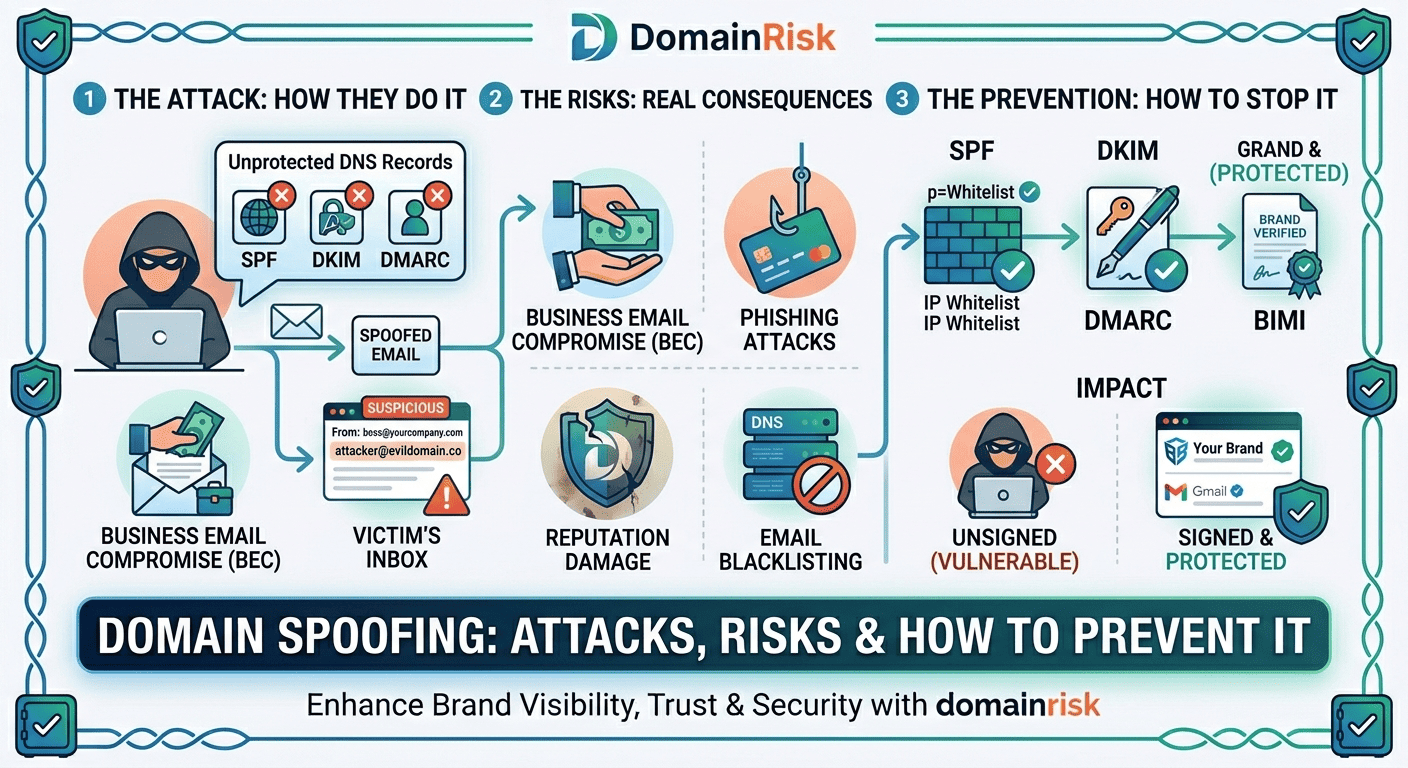
1What Is Domain Spoofing?
Domain spoofing is the act of forging the apparent sender identity of an email to make it look as if it originated from a domain it did not. The attacker uses your domain name in theFrom: header of the message — or in a lookalike domain that visually resembles yours — to deceive recipients into believing the communication is legitimate. No access to your mail server, email account, or credentials is required. The attack exploits the fundamental openness of the SMTP protocol, which was designed in 1982 and has no built-in sender authentication.
Domain spoofing is the vector. Phishing is the objective.
These terms are often conflated. Spoofing refers specifically to the identity forgery — making an email appear to come from your domain. Phishing is the social engineering attack that spoofing enables: tricking the recipient into clicking a malicious link, revealing credentials, or authorising a fraudulent payment. Spoofing can also serve as a vehicle for malware delivery, business email compromise, and brand damage — not just phishing.
Who is targeted?
Every domain is a potential target — not just well-known brands. Attackers spoof small and mid-size businesses precisely because their defences are weaker and their partners are more likely to trust an unexpected email without scrutiny. The most targeted domains are those in supply chains, financial services, SaaS, legal, and healthcare — sectors where email-based authority or urgency is a normal communication pattern.
Why it is so easy without protection
Sending an email with an arbitraryFrom: address requires nothing more than access to any SMTP server and a command-line tool. Without SPF, DKIM, and DMARC in place, receiving mail servers have no basis to reject the message. They deliver it to the inbox because the protocol instructs them to trust the sender's self-declared identity.
2Types of Domain Spoofing Attacks
Domain spoofing is not a single technique — it is a family of related attacks, each with a different evasion strategy and a different set of defences. Understanding the distinctions matters because each type requires a different countermeasure.
Exact-domain spoofing
The attacker sends email with your precise domain in the From: header — @yourdomain.com — from a server they control. Receiving mail servers accept the message if no DMARC policy exists at p=quarantine or p=reject. This is the highest-trust attack: recipients see nothing unusual in the sender address.
Stopped by: DMARC at p=reject. This is the only technical control that blocks exact-domain spoofing at the protocol level.
Lookalike domain spoofing
The attacker registers a domain that closely resembles yours — yourdom4in.com, your-domain.com, yourdomain.io, yourdornain.com — and sends from that domain. Email authentication on your legitimate domain is irrelevant here: the attacker controls the lookalike domain and can configure valid SPF, DKIM and DMARC on it. This makes it technically invisible to standard email security filters.
Stopped by: Defensive domain registration, brand monitoring, and recipient training. No DNS record on your domain prevents this.
Subdomain spoofing
If a subdomain of your domain — billing.yourdomain.com, noreply.yourdomain.com — is not covered by your DMARC policy or has its own permissive SPF record, an attacker can use it as a spoofing vector. Many organisations focus DMARC on the apex domain and leave subdomains unprotected.
Stopped by: DMARC sp= tag set to reject for subdomains, and auditing all subdomain DNS records.
Display name spoofing
The attacker sends from a completely different domain (attacker@gmail.com, attacker@random-domain.com) but sets the display name to Your Company Name or CEO First Last. Most email clients show only the display name by default, not the actual address. Recipients trust the name they recognise without inspecting the underlying address.
Stopped by: Recipient training and mail client configuration to show full addresses. No DNS record prevents this — it does not involve your domain at all.
Reply-to spoofing
The attacker sends an email that appears to originate from a legitimate or plausible address, but sets the Reply-To header to an address they control. When the recipient hits reply, their message goes to the attacker — not to the apparent sender. Particularly effective for multi-step fraud scenarios where the attacker needs a reply to build trust before escalating.
Stopped by: DMARC enforcement on the apparent From: domain, combined with recipient awareness of the Reply-To field.
3Real-World Consequences
Business Email Compromise cost $2.9 billion in 2023 — the single largest category of cybercrime loss.
According to the FBI IC3 2023 Annual Report, BEC and email account compromise generated more adjusted losses than ransomware, phishing, and data breaches combined. Domain spoofing is the primary enabler of BEC attacks targeting wire transfer fraud and executive impersonation.
Business Email Compromise and wire fraud
An attacker spoofs your CEO's email address and instructs your CFO to authorise an urgent wire transfer to a new vendor account. Or they impersonate your accounts payable team and redirect a supplier's bank details to their own account. These attacks succeed because the email appears to come from a trusted internal address — and because the urgency and authority conveyed in the message override normal verification instincts. Average loss per BEC incident: $125,000.
Customer and partner phishing — reputational damage
When your customers receive phishing emails that appear to come from your domain, they lose trust in your brand — even though you are the victim. The association between your domain and a fraudulent message can persist for months. Customers who were defrauded may seek legal recourse. Partners who were targeted may terminate the relationship. The reputational cost frequently exceeds the direct financial loss.
Domain blacklisting and deliverability collapse
When spoofed emails generate spam complaints and phishing reports, spam intelligence networks — Spamhaus, Barracuda, Proofpoint — may blacklist your domain. Once blacklisted, your legitimate email is rejected or routed to spam by every mail server that consults that feed. Remediation involves identifying the abuse source, implementing authentication controls, and submitting delisting requests — a process that takes days to weeks and disrupts business operations throughout.
Legal and regulatory exposure
Under GDPR Article 32, organisations are required to implement appropriate technical measures to protect personal data — including securing communication channels. If a spoofed email results in the compromise of customer personal data (credentials, financial information), your organisation may face regulatory scrutiny for failing to deploy available authentication controls. SOC 2 Type II assessors and cyber insurance underwriters increasingly include SPF, DKIM, and DMARC posture in their evaluation criteria.
4How Attackers Pull It Off — Technical Breakdown
Understanding the mechanics makes the prevention stack obvious. Each layer of authentication closes a specific gap in the SMTP trust model.
✕Without SPF — any server can send in your name
The SMTPMAIL FROM command (the envelope sender, or Return-Path) can be set to any value by any SMTP client. Without an SPF record, there is no published list of servers authorised to use your domain — receiving servers have no basis to reject messages from unknown senders. An attacker runs a standard SMTP tool from a VPS and sends:
MAIL FROM: <ceo@yourdomain.com>
RCPT TO: <target@victim.com>
DATA
From: CEO Name <ceo@yourdomain.com>
Subject: Urgent wire transfer required
...✕Without DKIM — message content is unverifiable
Without DKIM, there is no cryptographic signature on the message. Receiving servers cannot verify that the content has not been modified in transit, and cannot confirm that the claimed sending domain actually authorised the message. The message arrives with noDKIM-Signature header, or with a signature from the attacker's own domain — which is valid, but does not align with your domain in theFrom: header.
✕Without DMARC — no enforcement even with SPF/DKIM passing
Even if SPF and DKIM exist, without DMARC there is no alignment requirement and no enforcement policy. An attacker can pass SPF by controlling theReturn-Path domain (a different domain they own) while using your domain in the visibleFrom: header. DMARC alignment enforcement closes this gap by requiring that the authenticated domain matches theFrom: domain the recipient actually sees.
The three email headers attackers exploit
| Header | What it contains | Visible to recipient? | What SPF checks |
|---|---|---|---|
From: | The sender address displayed in the mail client — the one recipients see and trust. This is the field DMARC alignment enforces. | Yes — always | Does not check From: directly. SPF checks Return-Path. |
Return-Path: | The envelope sender, set by the MAIL FROM command. Used for bounce delivery. Rarely shown to recipients. | Hidden in most clients | SPF checks that the sending IP is authorised for the Return-Path domain. |
Reply-To: | The address that receives replies when the recipient clicks reply. Can be set to any value independently of From: and Return-Path. | Shown only on reply action | Not checked by SPF, DKIM, or DMARC. |
Tools attackers use — for educational context
Spoofing attacks require no specialised knowledge. Tools like Swaks (Swiss Army Knife for SMTP) allow arbitrary header injection from the command line in under 60 seconds. Gophish is an open-source phishing framework that automates spoofed email campaigns at scale. The low barrier to entry is precisely why DNS-layer defences are essential — they are the only controls that operate at a layer the attacker cannot bypass.
5How to Detect If Your Domain Is Being Spoofed
Domain spoofing is silent by design. The attacker sends directly to their targets — you receive nothing. Without active monitoring, you may not discover an ongoing campaign until customers report receiving suspicious emails, or until your domain appears on a blacklist.
Enable DMARC at p=none with aggregate reporting
Publish a DMARC record at p=none with an rua= address pointing to a mailbox you monitor (or a DMARC report processor). Within 24 hours, major mail providers — Gmail, Outlook, Yahoo — will begin sending daily XML aggregate reports listing every IP address that sent email claiming to be from your domain, along with SPF and DKIM pass/fail results. Any IP you do not recognise is either a misconfigured legitimate sender or an attacker. This is the most reliable detection method available and costs nothing to implement.
Analyse DMARC aggregate reports with a report processor
Raw DMARC aggregate reports are XML files — unreadable without tooling. Use a DMARC report processor to parse and visualise the data: Postmark DMARC Digests (free), Dmarcian, Valimail, or EasyDMARC. Look for unknown sending IPs with high volumes, especially those failing both SPF and DKIM — a strong indicator of active spoofing rather than a misconfigured legitimate sender.
Monitor lookalike domain registrations
Set up alerts for newly registered domains that resemble yours. Tools like DomainWatch, DNSTwist, and threat intelligence platforms track typosquatting registrations in near real time. A lookalike domain registered shortly before a targeted phishing campaign is a common precursor signal. At minimum, search periodically for your brand name in domain registration databases.
Scan for domain blacklist entries
Check your domain and sending IPs against major reputation databases — MXToolbox Blacklist Check, Spamhaus, Barracuda — monthly. A blacklist entry you did not expect is often the first visible indicator that spoofing abuse has been occurring long enough to generate complaints.
Run a DomainRisk.io scan for an instant posture snapshot
DomainRisk.io scans your DMARC policy, SPF authorisation, DKIM selectors and BIMI status in under 60 seconds. It flags any gap that leaves your domain open to exact-domain spoofing and scores your overall email security posture. No configuration required.
6How to Prevent Domain Spoofing — The Full Stack
Exact-domain spoofing is almost entirely preventable with the right DNS records in place. Each layer in the stack closes a different attack vector — they are cumulative, not interchangeable.
SPF — Authorise your sending servers
Publish a DNS TXT record at your apex domain listing every IP and service authorised to send email as your domain. An SPF record ends in -all (hard fail) to tell receiving servers to reject messages from any unlisted source. Without -all (or with the weaker ~all), SPF provides visibility but not enforcement. SPF alone does not stop exact-domain spoofing — an attacker can pass SPF using the Return-Path while spoofing the visible From:.
SPF guideDKIM — Cryptographic signing for every message
Configure your mail provider to cryptographically sign all outgoing messages with a private key. The corresponding public key is published in DNS. Receiving servers verify the signature to confirm the message was authorised by the domain and unmodified in transit. DKIM is the more resilient of the two DMARC pillars — it survives email forwarding where SPF breaks.
DKIM guideDMARC at p=reject — The only control that stops exact-domain spoofing
DMARC ties SPF and DKIM together with an alignment requirement and an enforcement policy. At p=reject, any message that fails both SPF alignment and DKIM alignment is rejected by the receiving server — it never reaches the inbox. p=quarantine routes it to spam. p=none monitors only. For spoofing prevention, p=reject is the goal. Reach it via the gradual rollout: p=none → p=quarantine → p=reject.
DMARC guideBIMI — Make your identity visually verifiable
Once DMARC is at enforcement level, BIMI lets you display a verified brand logo directly in the inbox. Recipients learn to associate your logo with legitimate email — and notice its absence on suspicious messages. BIMI combined with a Verified Mark Certificate (VMC) provides the strongest recipient-facing trust signal currently available in email.
BIMI guideDefensive domain registration for lookalikes
Register common typosquatting variants of your domain: transpositions (yourdomian.com), character substitutions (yourdom4in.com), TLD variations (yourdomain.co, yourdomain.net, yourdomain.io), and hyphen variants (your-domain.com). Point them all to your real site or to a parking page. This does not eliminate the lookalike threat entirely — there are too many variants to register them all — but it removes the most obvious targets.
| Attack type | SPF | DKIM | DMARC | Other |
|---|---|---|---|---|
| Exact-domain spoofing | Partial | Partial | Stops it | — |
| Lookalike domain | No effect | No effect | No effect | Brand monitoring |
| Subdomain spoofing | Partial | Partial | sp=reject | Subdomain audit |
| Display name spoofing | No effect | No effect | No effect | User training |
| Reply-to spoofing | No effect | No effect | No effect | User training |
7Domain Spoofing & Your Security Score
Indomain security scoring, spoofing exposure is assessed through theemail security axis— the combination of SPF, DKIM, DMARC, and BIMI posture. This axis carries significant weight because exact-domain spoofing is a directly exploitable risk, not a theoretical one. An organisation with no DMARC record is exploitable today, with tools available to any script-kiddie.
Missing DMARC
Critical — exploitable risk. Your domain can be freely used for phishing and BEC attacks with zero technical barrier. Immediate remediation required.
DMARC at p=none
Medium — monitoring only, no enforcement. You have visibility but no protection. Attackers can still send spoofed email that reaches inboxes.
DMARC at p=quarantine
Low — partial protection. Spoofed messages are routed to spam on supporting mail servers. Move to p=reject to achieve full enforcement.
DMARC at p=reject + BIMI
Hardened — full email identity enforcement with visual verification. The highest achievable posture for exact-domain spoofing prevention.
Scan your domain now — find out if you're exposed
DomainRisk.io checks your SPF policy, DKIM selectors, DMARC enforcement level, BIMI deployment and 30+ other risk factors in under 60 seconds. No setup, no credit card.
Scan my domain — it's free✓Key Takeaways
Domain spoofing requires no access to your infrastructure. An attacker can send email from your exact domain using only a VPS and a command-line SMTP tool — if you have no DMARC enforcement.
Spoofing is the vector, not the attack. BEC wire fraud, customer phishing, credential theft, and malware delivery all use domain spoofing as the delivery mechanism.
There are five distinct spoofing techniques. Only exact-domain spoofing is stopped by DMARC. Lookalike and display name spoofing require different countermeasures.
DMARC at p=reject is the only control that stops exact-domain spoofing at the protocol level. p=none monitors. p=quarantine partially filters. Only p=reject fully enforces.
SPF and DKIM are prerequisites for DMARC enforcement, not standalone protections. SPF alone cannot stop a spoofed From: header. DKIM alone cannot enforce a policy.
BIMI adds a visual trust layer on top of DMARC enforcement. Recipients see your verified logo before opening — and learn to notice its absence on suspicious messages.
DMARC aggregate reports are the primary detection tool. Publishing a DMARC record at p=none immediately tells you whether your domain is being spoofed — every source claiming your domain identity appears in the daily report.
Lookalike domain monitoring is complementary, not optional. DMARC cannot protect you from attackers who register yourdom4in.com and configure valid authentication on that domain.
Regulatory exposure is real. Under GDPR, NIS2, and SOC 2, failure to deploy available email authentication controls is a documented, auditable control gap.
Implement the prevention stack
Securing Domain Integrity: A Guide to Implementing DMARC
The critical step that turns monitoring into enforcement — the only control that stops exact-domain spoofing.
Read the guideEmail SecurityBIMI Setup Guide: Show Your Logo in Gmail, Apple Mail & Yahoo
Add a verified brand logo to your inbox presence — the visual trust layer that trains recipients to recognise legitimate email.
Read the guideEmail SecuritySPF Explained: How One DNS Record Stops Spoofing
Configure the foundational record that authorises your sending servers — the first prerequisite before DMARC enforcement.
Read the guideEmail SecurityDKIM Explained: How Cryptographic Signing Proves Your Emails Are Genuine
Add the cryptographic layer that makes DMARC resilient under forwarding — the second DMARC pillar.
Read the guide